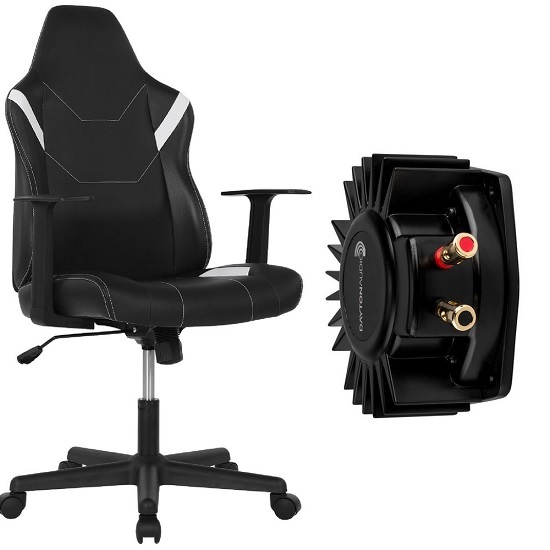
The Typhoon Bolt Gaming Chair, an affordable entry‑level model with a sleek leatherette finish, offers solid steel construction and comfortable seating for short gaming sessions. Though designed for 1‑3 hours of use rather than heavy daily wear, its sturdy frame makes it an ideal platform for a DIY bass‑shaker upgrade.
By installing a bass shaker, tactile transducer, the chair can be transformed into a haptic seat that delivers low‑frequency vibrations synced with in‑game explosions, engine roars and impacts, elevating immersion to a whole new level.
Overview of the Typhoon Bolt Gaming Chair
The Typhoon Bolt Gaming Chair is a budget-friendly entry-level option, typically priced around $99 at Officeworks. It offers decent comfort and stylish leatherette upholstery suited for 1-3 hour sessions, but lacks durability for heavy daily use. Features include gas-lift height adjustment, a tilt mechanism and easy assembly in approximately 30 minutes.
Bass Shaker Compatibility
The Typhoon Bolt provides a simple, cost-effective base for a DIY bass shaker modification. The steel frame and solid construction allow for secure attachment of small tactile transducers, despite not being sold as a standard feature.
How to Add a Bass Shaker
Mount a transducer, such as the Dayton Audio BST-1, directly to the metal frame underneath the seat or backrest. Use heavy-duty zip ties or self-tapping screws to ensure direct contact with the solid structure for maximum vibration transfer.
Installation Steps and Tips
- Mounting Location: Attach the shaker under the seat base to the metal frame, avoiding wood or plastic coverings.
- Securing the Shaker: Use high-strength, thick zip ties if screwing directly into metal is not possible. Alternatively, create a small wood or HDPE plate to bridge the frame.
- Amplifier and Connection: Use a dedicated amplifier (e.g., Nobsound G2 PRO) to power the shaker. Connect to your PC’s audio output and use SimHub for detailed haptic feedback control.
- Handling Wires: Leave enough cable slack to allow the chair to move and recline without tearing wires.
Required Components
- Bass Shaker: Dayton Audio BST-1 Bass Shaker (available from Campad Electronics)
- Amplifier: 100W sub amp Nobsound G2 PRO (available on Amazon AU)
- Mounting Hardware: Bolts, nylon lock nuts and/or metal plates
- Audio Cable: 3.5mm to Stereo RCA Cable for PC/console connection
Tips for Success
- Minimize Soft Parts: Do not insulate the shaker with thick foam; it must be near the frame.
- Use Locking Nuts: Vibrations will loosen regular nuts over time.
- Manage Cables: Ensure cables from the chair to the amp have enough slack for reclining.
Rattle Mitigation
The Typhoon Bolt has a sturdy frame, but excessive vibration can cause rattles. Tighten all existing bolts on the chair before installation. Consider using rubber washers to dampen plastic-on-metal noise if using screws.
Connecting the Nobsound G2 PRO Amp to a PC or Console
Use a 3.5mm to Stereo RCA Cable (3.5mm to 2RCA). Plug the 3.5mm end into the PC/console headphone jack and the RCA ends (red/white) into the “AUDIO IN” ports on the G2 PRO. The amplifier features stereo RCA input summed to mono internally.
Recommended Cables
- 3.5mm to RCA Cable: Standard for PC/console headphone jacks.
- RCA to RCA Cable: For PCs with RCA outputs or external DACs.
- High-Quality Audio Cables: Recommended to minimize noise, such as Elecom USB cables for DAC-to-amp setups.
Key Setup Details
- Input: STEREO RCA (red and white)
- Mode: Toggle to “PBTL” for full frequency or “SUB” for subwoofer mode
- Tip: Ensure high-quality cables to reduce interference
If using a DAC or USB audio interface instead of the 3.5mm jack, connect that device to the G2 PRO’s RCA input.
Verdict
Adding a bass shaker transforms the Typhoon Bolt from a basic budget seat into an immersive haptic platform. The low-cost transducer and modest amplifier deliver deep, directional vibrations synced with explosions, engine roars and in-game impacts, enhancing spatial awareness and presence. The steel frame efficiently transfers vibration to the user, yielding noticeable low-frequency sensations without a separate subwoofer.
This upgrade extends the chair’s utility into a multi-sensory gaming hub, customizable with software like SimHub for tailored feedback profiles. The result is a more engaging, visceral experience that rivals higher-priced haptic-enabled chairs while preserving the Typhoon Bolt’s affordable price and easy assembly.
Disclaimer: Modifying the chair by drilling holes may void the warranty of your Typhoon Bolt chair.
FAQs
Which bass shaker model is recommended for the Typhoon Bolt?
The Dayton Audio BST‑1 is a compact, 2‑inch tactile transducer that fits easily under the seat frame and provides sufficient low‑frequency output for a budget chair.
Do I need to drill holes in the chair to mount the shaker?
Drilling is not required. Heavy‑duty zip ties, self‑tapping screws, or a small metal/HDPE mounting plate can secure the shaker to the existing steel frame without permanent modifications.
Can I use the chair’s plastic backrest for mounting?
No. Mount the shaker directly to the metal frame. Plastic or foam layers absorb vibration and reduce the tactile effect.
What amplifier should I pair with the BST‑1?
A 100 W class‑D sub‑amp such as the Nobsound G2 PRO provides enough power and includes a mono summing input for a single shaker.
How do I connect the amplifier to a PC or console?
Use a 3.5 mm‑to‑RCA cable: plug the 3.5 mm tip into the headphone/line‑out jack of the PC or console, then connect the red/white RCA plugs to the “AUDIO IN” ports on the G2 PRO. If using a DAC or USB audio interface, connect its RCA outputs to the amp.
Will the amplifier’s “PBTL” and “SUB” modes affect the shaker?
Yes. “PBTL” (parallel bridge‑tied load) delivers full‑range power, while “SUB” limits the output to sub‑woofer frequencies. For a tactile transducer, “SUB” is typically preferred to emphasize low‑frequency rumble.
How much cable slack is needed?
Provide at least 30cm of free length between the shaker and the amp, routed along the chair’s underside. This prevents strain when the chair reclines or is moved.
Will the added vibration cause the chair to rattle?
Tighten all original bolts before installation. Add rubber or silicone washers under any new screws to dampen metal‑on‑metal resonance. If rattling persists, place a thin layer of felt between the shaker and the frame.
Do I need to insulate the shaker with foam?
No. Direct contact with the metal frame maximizes vibration transfer. Excessive foam will deaden the effect.
Can I install multiple shakers for a stronger effect?
Yes. Two BST‑1 units (one under the seat, one under the backrest) can be wired in parallel to the same amp channel. Ensure the amp’s power rating can handle the combined load.
Will installing a shaker void the chair’s warranty?
Modifying the chair by drilling or permanently altering components may void the manufacturer’s warranty. Using non‑invasive mounting methods (zip ties, brackets) reduces this risk.
Is the Typhoon Bolt’s steel frame strong enough for continuous vibration?
The steel frame is designed for regular use and can handle the low‑frequency forces produced by a single BST‑1 without structural fatigue.
What software can I use to control haptic feedback?
SimHub, along with game‑specific plugins or custom scripts, can send audio‑frequency or MIDI triggers to the amp, synchronizing vibrations with in‑game events.
How loud can the shaker get before it becomes uncomfortable?
Start with the amp’s gain set low (around 20 %); increase gradually until the vibration is perceptible but not painful. Typical comfortable levels are 70‑80 dB SPL at the seat surface.
Can the setup be used with a console (e.g., PS5, Xbox Series X)?
Yes. Connect the console’s headphone or line‑out jack to the amp via the same 3.5 mm‑to‑RCA cable. Ensure the console’s audio output is set to “Stereo” rather than “Surround” for optimal shaker response.